Managing hosts
Add
sshnav host add \
  --alias prod-api \
  --hostname api.example.com \
  --user deploy \
  --port 2222 \
  --group production \
  --tag api --tag critical
Use sshnav add when you prefer a guided form with group, jump-host, and private-key completion.
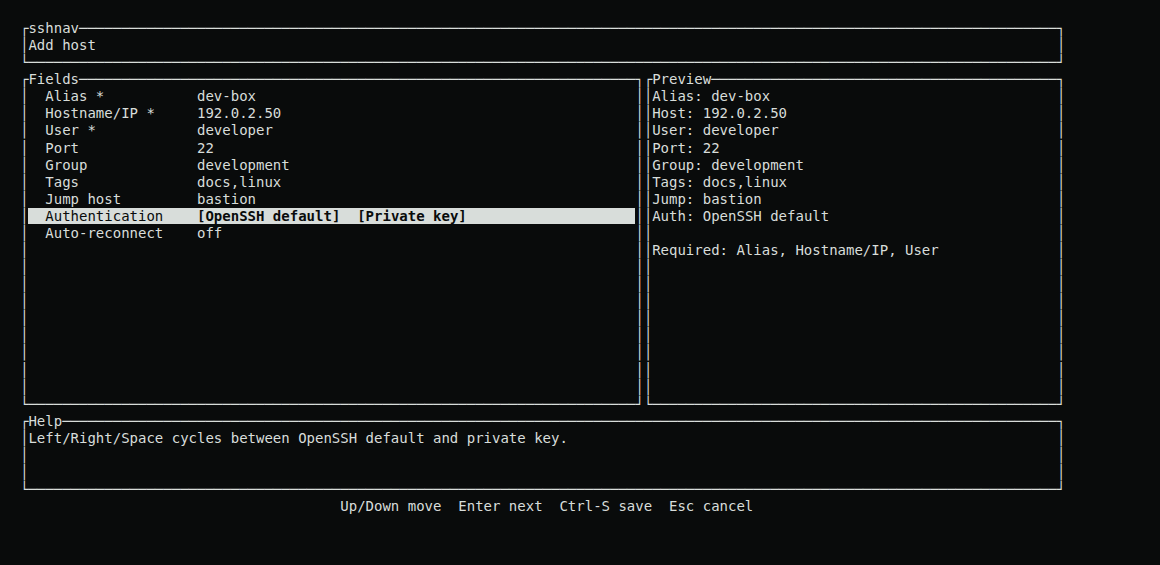
The guided form previews the saved connection while you enter it.
List
sshnav host list
sshnav host list --json
sshnav host list --group production --tag db
sshnav host search 'g:prod t:db api'
JSON output is useful for inspection and small local scripts. Secret material is never included. --group, --tag, and --user keep matching hosts; host search also accepts picker prefixes such as g:, t:, u:, and unreachable:.
Edit
sshnav host edit prod-api --hostname api-2.example.com --port 22
sshnav host edit prod-api --proxy-jump bastion
sshnav host edit prod-api --no-proxy-jump
Only supplied fields change. Use the explicit --no-* flags to disable reconnect or clear a jump route.
In the picker, Ctrl+E opens the edit form, including the alias field. Renaming there rewrites jump routes that pointed at the old alias.
Duplicate
sshnav host duplicate prod-api staging-api
Every saved host field is copied. If the source has an encrypted key, the destination receives an independent database secret record, so later deleting either host does not remove the other's key.
In the picker, Ctrl+D opens a prefilled duplicate form so you can adjust the hostname, user, port, tags, group, jump route, and authentication before saving.
Remove
sshnav host remove staging-api
Removing a host also removes its associated tags, forwards, options, and encrypted secret rows.
Rename
sshnav host rename prod-api api-v2
The new alias must be unique and valid. Hosts whose saved jump route named prod-api are updated to api-v2. Literal OpenSSH hops such as ubuntu@bastion.example are left unchanged.